★★★★★
“Moving conversations out of personal WhatsApp and into PaddlePals has been a game changer. Any staff member can now jump in and help players without hunting for screenshots.”
Answer booking questions, send event invites, share offers and keep general conversations going – all from one Customer Chats screen that every staff member can use confidently.
PaddlePals Customer Messaging is designed for real court operations – handling live bookings, team communication and everyday questions in one place.
Players message to ask about availability, prices or to move a booking. Staff can see who is asking, open their profile and adjust bookings from the same system without juggling multiple apps.
Use chats to confirm league fixtures, send last‑minute changes and answer questions about tournaments or socials. Everyone sees consistent information straight from the source – your club.
Keep conversations going with your most active players: follow up on feedback, invite them to new sessions and check in after big events – all recorded against their member record in PaddlePals.
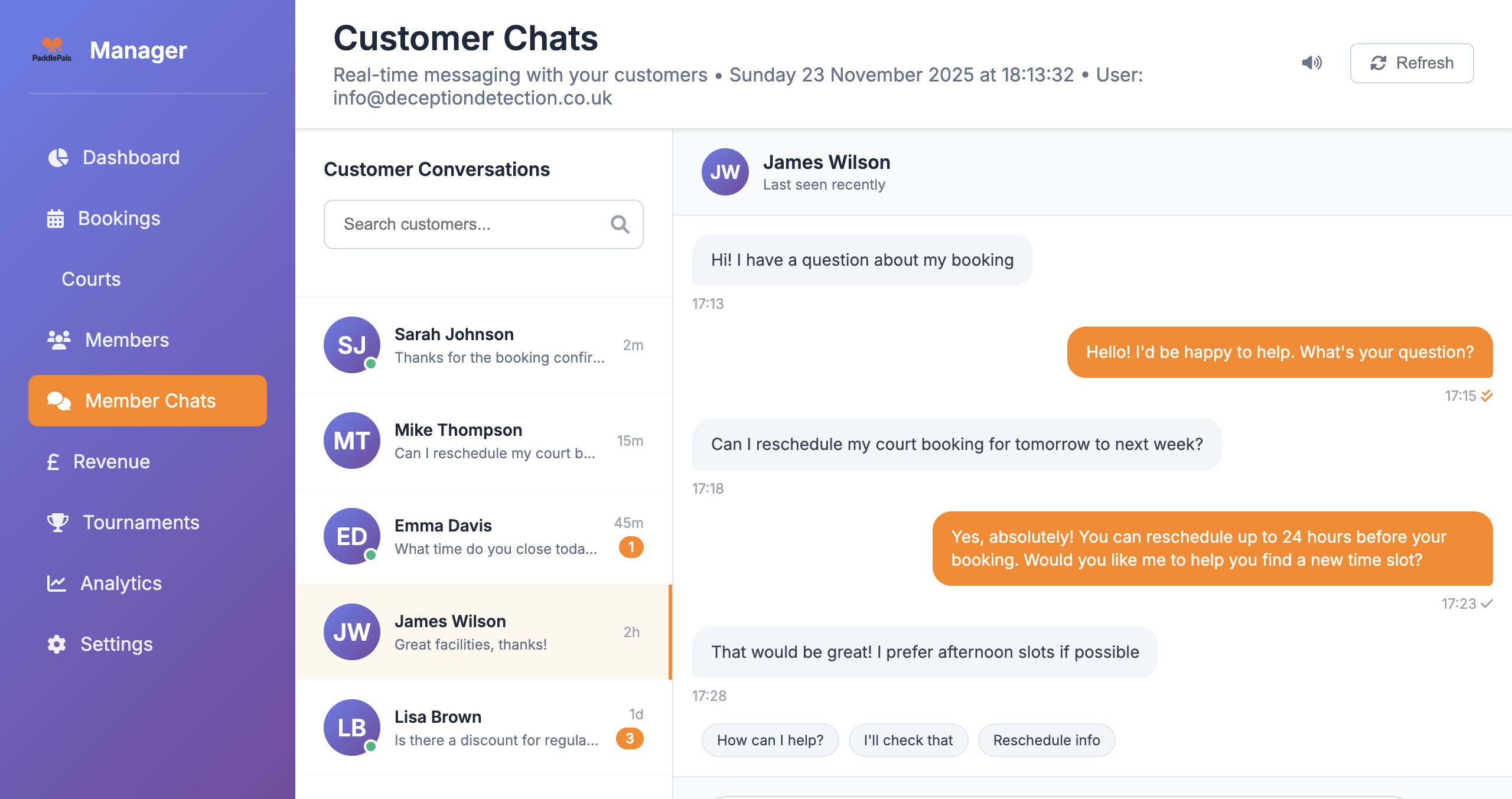
The Customer Chats view in PaddlePals shows all your player conversations down the left, with the active chat on the right. Staff can reply quickly, use quick‑reply buttons and keep players updated without leaving the dashboard.
A few practical examples of how padel and tennis facilities use PaddlePals chats every week.
When the weather changes or players cancel at short notice, members message the club to check options. Staff can quickly reply, move bookings or suggest alternative times – reducing empty courts.
Keep team captains and squad players updated about training times, friendly matches and travel details. No more relying only on personal WhatsApp groups that staff never see or control.
Let players know about temporary court closures, surface work, bad weather, or changes to opening hours. Send clear, timely messages right where people already talk to your club.
Respond quickly to complaints or suggestions, send follow‑ups after busy events and check in with lapsed players. Good communication is often the difference between a lost member and a loyal fan.
Turn every question into a chance to build loyalty, fill courts and keep your players happy.
Instead of chasing emails, texts and social DMs, all customer conversations sit in one place – so any staff member can pick up where the last reply left off.
Handle booking changes, cancellations and questions in seconds. Quick replies mean staff can send accurate, friendly answers even at busy times.
Once a chat is open, it’s the perfect place to send players info about new leagues, socials, coaching blocks or last‑minute deals, without feeling spammy.
Customer chats link back to your PaddlePals members and bookings. You always know who you’re talking to and what they’ve booked with your club.
Many clubs start with personal WhatsApp, email and social DMs – but quickly outgrow them when more courts, members and staff get involved.
When all conversations live in PaddlePals, any authorised staff member can reply. You’re no longer dependent on one manager’s personal phone for all club communication.
Chats connect to actual member records and bookings. When someone messages, you can see who they are, what they’ve booked and any notes – instead of guessing from a mobile number alone.
Keeping communication inside your club system makes it easier to manage handovers, respect privacy and keep a record of important conversations, compared to informal messaging apps.
Real feedback from clubs using PaddlePals Customer Messaging to support players and keep courts busy.
“Moving conversations out of personal WhatsApp and into PaddlePals has been a game changer. Any staff member can now jump in and help players without hunting for screenshots.”
“Most of our booking changes now come through Customer Messaging. Players get quick answers, and we keep a clear record of what was agreed.”
“Having chats linked to member profiles means we always know who we’re talking to, what they play and how often they book. It’s made our service feel much more personal.”
“When courts close at short notice we message everyone affected from one place. No more scrambling across email, Facebook and old phone lists.”
“Customer Messaging has become our default channel for league fixtures and squad updates. Players know exactly where to look for the latest info.”
“Because chats live inside PaddlePals, handovers between staff are simple. The next shift can see every message and pick up the conversation without missing a beat.”
How the chats feature fits into the rest of PaddlePals Manager.
Yes. The Customer Chats screen you see here is the same Member Chats section inside PaddlePals Manager – just explained for court owners. It gives you one place to message players about everything from bookings to events.
Yes. Customer Messaging keeps a full history of conversations with each player, regardless of which staff member replied. Anyone with access to PaddlePals Manager can see the context before answering, which avoids mixed messages and repeated questions.
Definitely. Many clubs use email for broad announcements and Customer Messaging for 1‑to‑1 follow‑ups, booking questions and personalised offers. Both tools sit inside PaddlePals Manager and work from the same member data.
Customer Messaging is built for busy clubs, so you can handle conversations with as many players as you need. The chats list and search make it easy to find and manage multiple conversations at once during peak times.
As long as they have access to your PaddlePals Manager account with the right permissions, staff can see and reply to chats. This keeps conversations central, instead of tied to one person’s phone.
Yes – and it works very well. Many clubs use Customer Messaging to mention new tournaments, leagues, socials or limited‑time offers while they are already helping players with bookings.
Customer / member messaging is included on the Professional and Champion tiers of PaddlePals Manager. You can start on Standard and upgrade when you’re ready to open direct chat with players.