★★★★★
“For the first time we can see exactly what each court earns every week. It’s made pricing and scheduling discussions with the committee so much easier.”
See today’s revenue, this week’s performance, monthly targets and court utilisation on a single, clean dashboard – built from the same screens your team uses inside PaddlePals Manager.
Use PaddlePals Revenue Manager for quick daily checks, weekly reviews and deeper monthly analysis – without exporting a single spreadsheet.
Log in and see today’s revenue, yesterday’s comparison and live court utilisation. Perfect for spotting slow days early and deciding whether to run offers or adjust pricing.
Compare this week’s revenue to last week, identify which courts and sports are driving income, and decide where to focus marketing or email campaigns for the coming days.
At the end of each month, use trends and breakdowns to explain performance to owners, committees or investors. Show clear numbers instead of rough estimates.
These are the exact Revenue Analytics screens managers see inside PaddlePals – overview cards, trends and breakdowns that turn raw bookings into clear financial insight.
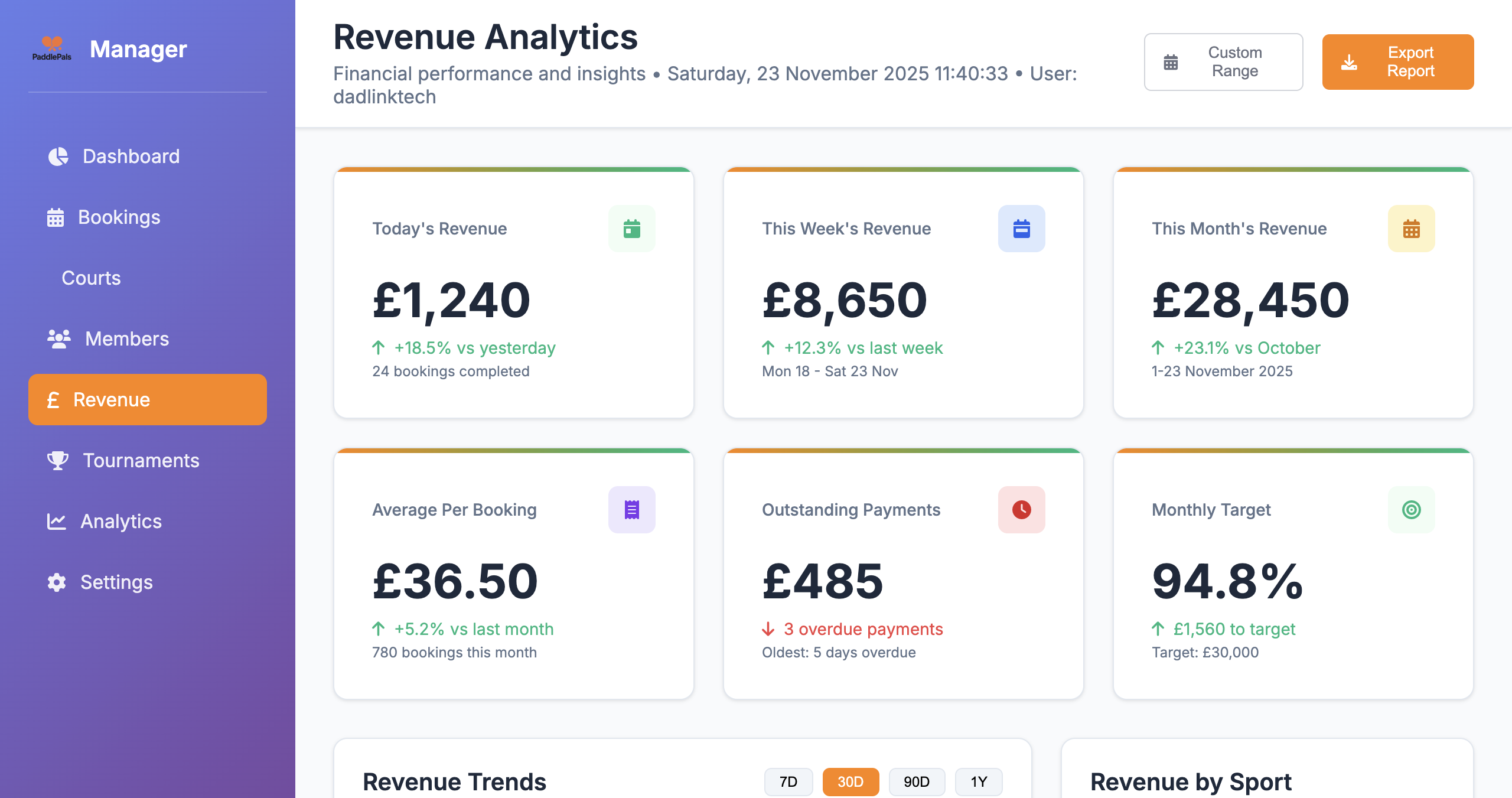
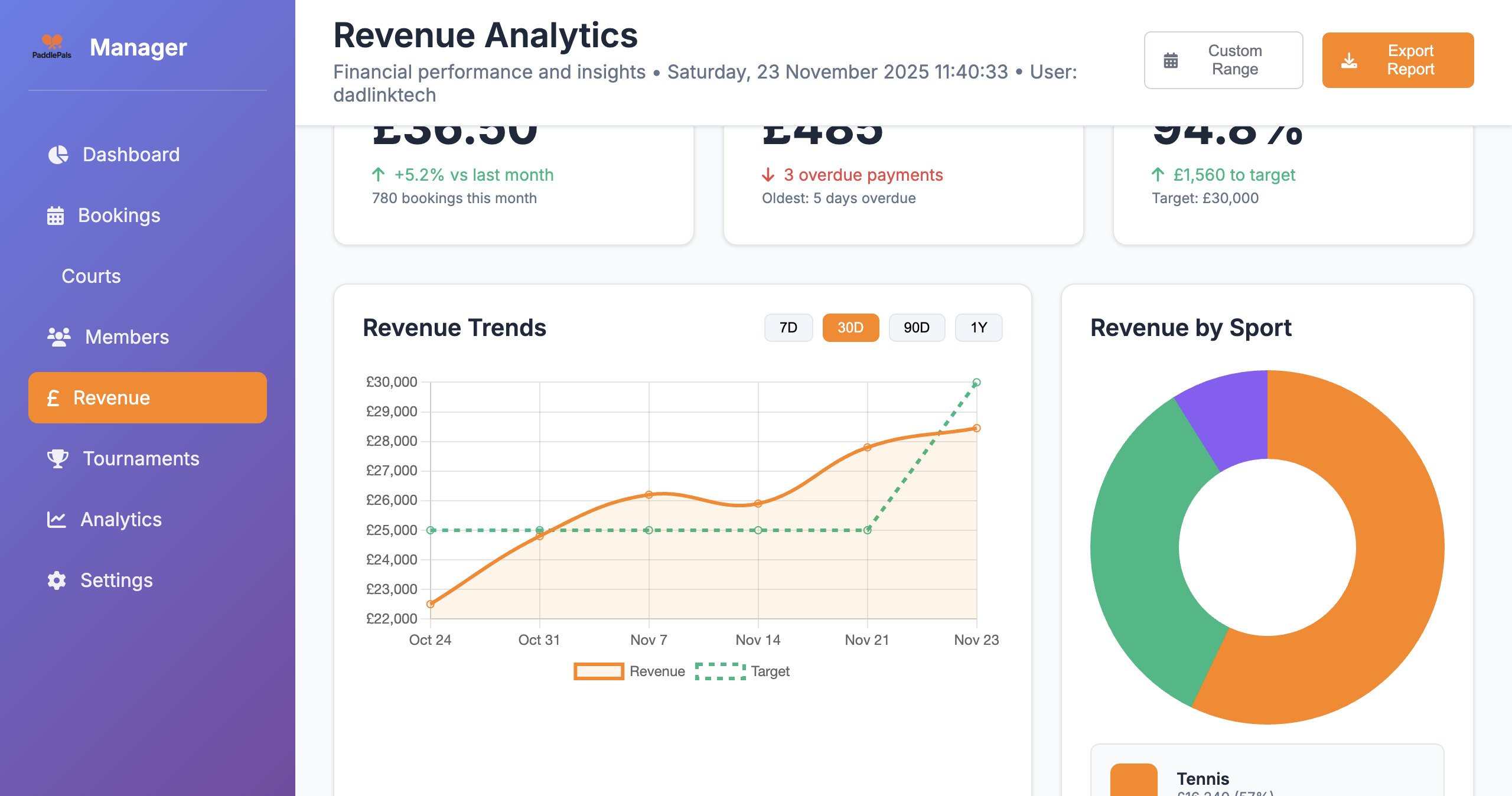
PaddlePals turns raw booking data into the financial KPIs racket clubs care about most – without needing a data analyst.
Track total booking revenue for today, this week and this month, along with average revenue per booking and per court hour – key indicators of pricing and demand across your facility.
See how much of your available court time is actually used. Combine utilisation with pricing to understand whether you need more demand, higher prices or new products like coaching blocks and socials.
Break revenue down by padel, tennis, pickleball and multi‑sport courts. Quickly see which activities pay the bills and which might need restructuring or support.
Set simple monthly revenue targets and track progress in real time. If you’re behind, you’ll know early enough to adjust pricing, promote quieter slots or run campaigns to close the gap.
Stop digging through spreadsheets. See your most important revenue numbers as soon as you log in – updated in real time as bookings come in.
Track progress towards clear revenue targets. See how far you are from your goal and adjust pricing, offers or utilisation before the month is over.
Use revenue breakdowns by court and sport to understand what drives your income. Optimise schedules and invest where demand is strongest.
When members, committees or owners ask “How are we doing?”, you’ll have clear charts and numbers to show them – not guesswork.
Revenue Manager pulls data directly from your PaddlePals booking system, so every pound on screen is backed by real bookings and real courts.
Use exports and summaries to share with your accountant, committee or business partners. Less time preparing reports, more time improving results.
Revenue Manager isn’t just a dashboard – it’s a decision‑making tool for club managers, directors and committees.
Use revenue and utilisation data to test new prices on peak and off‑peak slots. See the impact over 7, 30 and 90 days instead of guessing whether a price change worked.
Identify quiet times of day or under‑performing courts and add new social sessions, coaching blocks or leagues. Then track whether those ideas really move the revenue needle.
Use clean charts and data when applying for funding, negotiating leases or planning new courts. Showing real revenue trends makes your case far stronger than rough estimates.
Real feedback from clubs using PaddlePals Revenue Manager to understand performance and hit their targets.
“For the first time we can see exactly what each court earns every week. It’s made pricing and scheduling discussions with the committee so much easier.”
“The daily revenue cards are our go‑to morning check. We know within seconds if we’re ahead or behind target and can react quickly with offers.”
“Being able to break revenue down by sport showed us padel was carrying the club. We doubled down on those sessions and it’s transformed our numbers.”
“Month‑end reports used to take me half a day in spreadsheets. Now I export from PaddlePals in minutes and the board actually understands the charts.”
“Revenue Manager gives us confidence to tweak prices. We can see the impact over 30 and 90 days instead of arguing from gut feel.”
“For multi‑sport and multi‑court operations it’s a no‑brainer. Revenue by court, by sport and against target all in one place.”
Common questions from court owners about how revenue analytics works in PaddlePals.
The Court Revenue Manager pulls numbers directly from your PaddlePals bookings – both online bookings and any manual bookings you add – so the figures always reflect what actually happened on your courts.
Yes. Because Revenue Manager is built on your PaddlePals booking data, you can report separately on standard court bookings, coaching sessions, classes and events – depending on how you categorise your bookings in the system.
It does. Multi‑sport racket clubs can see revenue by sport and by individual court, and multi‑site operators can review performance across locations when they use PaddlePals across their estate. The structure follows how your courts and bookings are set up in PaddlePals Manager.
Revenue Manager reflects income generated from bookings recorded in PaddlePals, including online and manual entries. Most clubs use it as their operational revenue view, and reconcile it with their accounting system at month‑end using exports and summaries from PaddlePals.
Yes. The “Revenue by Sport” and “Revenue by Court” breakdowns show you which courts and sports generate the most income, helping you decide where to focus marketing and investment.
It does. Utilisation metrics show how much of your available court time is actually being used, so you can combine both price and occupancy to understand performance properly.
Yes. Inside PaddlePals Manager you’ll be able to export summary reports and use them for finance meetings, board reports or funding applications.